Configuring Logging
Logging is configured on a per service basis for each CygNet service, by setting the values of several keywords in its service configuration file. Some logging options can also be entered via command-line parameters.
Service Configuration Files
The service configuration file (Service.cfg) for each service is located in the CygNet\Services\Service folder on your host server. In the file, use the following keywords to define logging for your service.
- In the Associated Services section of the file, the ELS keyword specifies the name of the Event Logging Service to which information is written.
- In the Logging Keywords section of the file, a group of keywords together specify what type(s) of events are logged, and specify log file maintenance details.
|
Logging Keywords |
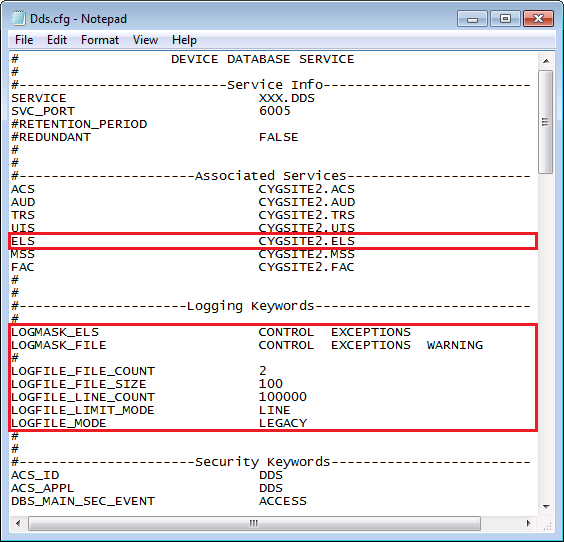
See Service Configuration Keywords for each Service for more information about using these keywords.
Associated Services ELS Keyword
Associated Services keywords include an ELS keyword.
| Keyword | Definition |
|---|---|
|
ELS |
The Site and Service name of the service’s ELS, in Site.Service format. |
Use this keyword value to specify the ELS or ELSALM to which log files for your service will be written. Type in the desired ELS Site and Service name, in Site.Service format, and save the file.
Note: The logging keyword that defines the logging retention period (the number of days an ELS retains logging information) is a configuration parameter of the associated ELS, and is specified within that ELS configuration file. See the Retention Period Keywords for ELS and for ELSALM for more information.
Other Logging Keywords
Logging keywords include LOGMASK and LOGFILE types. Use these keywords in conjunction with one another to specify logging behavior for the selected service.
LOGMASK Keywords
The LOGMASK keywords define what types of events are written to the designated logging service and to the service log files.
| Keyword | Definition |
|---|---|
|
Specifies the types of service events to be logged to the associated ELS (specified in the ELS keyword). To disable logging to the ELS, comment out the ELS keyword for the selected service. See the Note below this table for more information about the keyword values. The LOGMASK_ELS (LMask ELS) info item will report the value of this keyword. See LOGMASK_ELS in the Logging section for more information. |
|
|
Specifies the type(s) of service events to be logged to the service’s log file ([file name].log). During the current session of the service, data is written to the current log file. Log file names follow the naming convention of the selected logging mode (as set by the LOGFILE_MODE keyword value). See the Note below this table for more information about the keyword values. The LOGMASK_FILE (LMask File) info item will report the value of this keyword. See LOGMASK_FILE in the Logging section for more information. |
For each LOGMASK keyword (LOGMASK_ELS or LOGMASK_FILE), use the following values to specify the type(s) of information to log to that location. Valid keyword values can be used alone or in combination.
Note: Use the following keyword values to set logging options for the LOGMASK_ keywords.
- LOG_ALL — logs all options. This is the highest level of logging and will log everything the service is programmed to log.
- CONTROL — logs control operations, such as startups, shutdowns and UIS operational events, etc.
- ENTER_EXIT — logs every entry and exit through functions. This is used primarily by a programmer to debug code, and is too verbose for the ELS (not applicable for LOGMASK_ELS).
- EXCEPTIONS — logs all exceptions thrown, not all of which are severe. An exception is an unexpected event occurring during execution of the service. It could be the result of a configuration error, an invalid command parameter, a bug, etc.
- MAX_TRACE — more verbose logging than MIN_TRACE. This is used primarily by a programmer to debug code, and is too verbose for the ELS (not applicable for LOGMASK_ELS).
- MIN_TRACE — used primarily by a programmer to debug code.
- PROG_STAT — typically used to monitor the progress of the code through some logical steps. Some services, like the GNS, use it to add to the logging of the notifications, acknowledgments, and operations.
- STATISTICS — enables gathering and reporting of message processing statistics.
- WARNING — logs anomalies, not as serious as exceptions.
There is no order of precedence for the logging options, except that LOG_ALL logs everything.
Example
A value for LOGMASK_ELS might be CONTROL + EXCEPTIONS.
A value for LOGMASK_FILE might be CONTROL + EXCEPTIONS + WARNING + PROG_STAT.
LOGFILE Keywords
The LOGFILE keywords work together to define the way log file sets are maintained by the service.
| Keyword | Definition |
|---|---|
|
Specifies the maximum number of log files that a service will create before it starts re-using log files. For example, a count of two will produce SVC001.log, then SVC002.log, and then start back at SVC001.log, where SVC is the name of the service. Specify any value from 2 to 100. The LOGFILE_FILE_COUNT (File Cnt) info item will report the value of this keyword. See LOGFILE_FILE_COUNT in the Logging section for more information. |
|
|
When the value of the LOGFILE_LIMIT_MODE keyword is set to SIZE, this keyword specifies the maximum size (in megabytes) allowed for a log file, before logging will be continued using the next log file. Possible maximum size values are user-determined, respecting the limits of your specific system configuration. The default value is 100 megabytes. When the specified limit is reached, the log finishes the current line, closes the current file, and then continues logging in the next available log file. The LOGFILE_FILE_SIZE (File Size) info item will report the value of this keyword. See LOGFILE_FILE_SIZE in the Logging section for more information. |
|
|
Specifies how to limit the size of each individual log file. Options are LINE (maximum line count is determined by the LOGFILE_LINE_COUNT keyword) or SIZE (maximum file size in megabytes) determined by the LOGFILE_FILE_SIZE keyword). The LOGFILE_LIMIT_MODE (Limit Mode) info item will report the value of this keyword. The default value is LINE. See LOGFILE_LIMIT_MODE in the Logging section for more information. |
|
|
When the value of the LOGFILE_LIMIT_MODE keyword is LINE, this keyword specifies the maximum number of lines per log file. When the specified line count is reached, the log file is truncated at the limit point, and logging is resumed using the next available log file. Specify any value from 1000 to 1000000. The LOGFILE_LINE_COUNT (Line Cnt) info item will report the value of this keyword. See LOGFILE_LINE_COUNT in the Logging section for more information. |
|
|
Specifies the operational mode for the log file, that is, how log files are maintained. Options are LEGACY or EXTENDED. The default value is LEGACY. The LOGFILE_MODE (Logging Mode) info item will report the value of this keyword. See LOGFILE_MODE in the Logging section for more information. LEGACYIn LEGACY mode two log file sets are maintained: the current log file set and the previous log file set. When a service is stopped and restarted, a new log file is generated and log files from the previous session are renamed as follows:
EXTENDEDIn EXTENDED mode multiple log file sets are created and maintained: the current log file set and multiple previous log file sets, up to the limits specified by the LOGFILE_FILE_COUNT and either the LOGFILE_LINE_COUNT or LOGFILE_FILE_SIZE keywords. When a service is stopped and restarted, the most recent log file is opened to resume logging with current information. A new log file is created only when the LOGFILE_LINE_COUNT or LOGFILE_FILE_SIZE for the file is exceeded, as follows:
|
Command-Line Parameters
Use the following standard command-line parameters to control log file creation.
|
/MAX_LOG_FILES:<maximum_number_of_log_files>
/MAX_LOG_LINES:<maximum_number_of_log_file_lines>
/MAX_LOG_SIZE:<maximum_size_of_log_file> |
The log file is written to the current working directory.
The following standard command-line logging level parameters can also be used to define log file content.
|
/LOG_ALL
/LOG_NONE
/LOG_CONTROL
/LOG_EXCEPTIONS
/LOG_WARNING
/LOG_PROG_STAT
/LOG_MIN_TRACE
/LOG_MAX_TRACE
/LOG_ENTER_EXIT
/LOG_STATISTICS
/LOG_PROFILE_MIN
/LOG_PROFILE_MAX |
Note: These options apply to most clients, services, and utilities. All options may not apply to all usages.
See Service Log Settings and Client Log Settings for more information about applicable logging options.


